iPhone Battery Health: When Should You Replace the Battery?

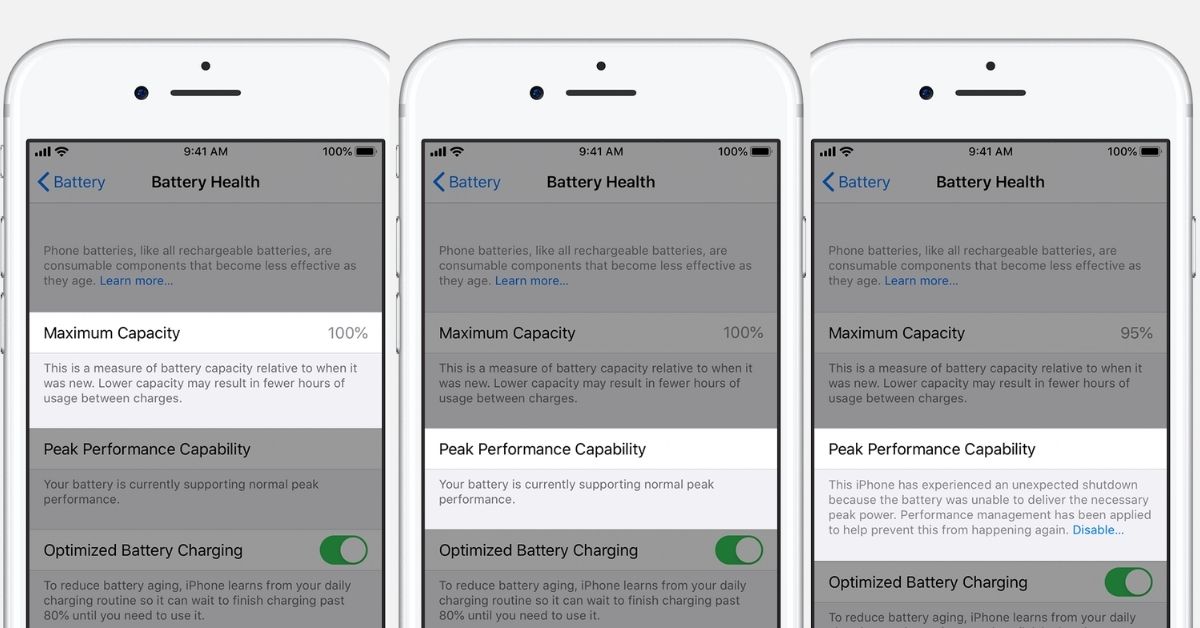
iPhone battery health is one of the most important indicators of how well an older iPhone can perform throughout the day. As a battery chemically ages, its maximum capacity decreases and the time you can use the iPhone between charges can become shorter.
But when should you actually replace an iPhone battery?




The answer is not simply “when battery health reaches 80%.” Apple uses 80% as an important reference point for battery longevity, but the actual need for replacement also depends on battery performance, unexpected shutdowns and your daily usage.
What Does iPhone Battery Health Mean?
iPhone Battery Health shows the battery’s maximum capacity compared with when the battery was new.

A new battery can normally display close to 100% maximum capacity. As the battery chemically ages, that percentage gradually decreases.
For example, if your iPhone shows 85% maximum capacity, the battery can theoretically hold about 85% of the capacity it had when it was new.
This does not mean that the battery is defective. Rechargeable batteries naturally lose capacity over time.
Is 80% Battery Health the Time to Replace an iPhone Battery?
80% is an important reference point, but it is not a mandatory replacement threshold for every iPhone.
Apple says batteries in iPhone 14 models and earlier are designed to retain 80% of their original capacity after 500 complete charge cycles under ideal conditions. Batteries in iPhone 15 models and later are designed to retain 80% after 1,000 complete charge cycles under ideal conditions.
Apple also notes that the exact battery capacity depends on how the device is regularly used and charged.
In practical terms, an iPhone with 82% battery health can still work perfectly well, while another iPhone with a higher percentage may have a battery problem that affects everyday use.
When Should You Replace the Battery?
Battery replacement becomes more reasonable when one or more of the following problems appear:
- Battery life has become significantly shorter.
- The iPhone needs to be charged several times a day.
- The battery health screen recommends service.
- The iPhone experiences unexpected shutdowns.
- Performance is affected by an aged battery.
- The device becomes difficult to use during normal daily activities.
Apple explains that as a battery chemically ages, its ability to deliver peak performance can also decline. iOS can display information about the battery’s peak performance capability and whether performance management has been applied.
How to Check iPhone Battery Health
The location of the battery health information depends on the iPhone model.
iPhone 15 and Later
On iPhone 15 models and later, open:
Settings > Battery > Battery Health
On supported software versions, this section can show maximum capacity, cycle count, battery manufacture date, first-use date and whether battery replacement is recommended.
iPhone 14 and Earlier
On iPhone 14, iPhone 13, iPhone 12, iPhone 11 and compatible earlier models, open:
Settings > Battery > Battery Health & Charging
You can see maximum capacity and information about peak performance capability.
What Does Battery Cycle Count Mean?
A charge cycle does not necessarily mean charging the iPhone from 0% to 100% in one session.
Apple defines a complete cycle based on using an amount equivalent to 100% of the battery’s capacity. For example, using 50% of the battery one day and another 50% the next day would add up to approximately one complete charge cycle.
Battery cycle count is particularly useful on iPhone 15 and later because Apple provides this information directly in the Battery Health section.
iPhone Battery Health at 90%
If your iPhone battery health is around 90%, there is generally no reason to replace the battery simply because of the percentage.
A 90% maximum capacity means the battery has lost some of its original capacity, but it can still provide good everyday performance.
If battery life is still sufficient for your daily needs and iOS does not recommend service, continuing to use the battery is a reasonable option.
iPhone Battery Health at 85%
At 85%, the battery has experienced more noticeable capacity loss, but replacement is still not automatically necessary.
The important question is whether the reduced capacity affects your daily use.
If the iPhone comfortably lasts through your normal day, there may be little practical benefit to replacing the battery immediately.
iPhone Battery Health at 80%
At 80%, the battery has reached the capacity level Apple uses in its battery longevity specifications.
This does not mean that the iPhone will stop working or that the battery must immediately be replaced. However, if battery life has become inconvenient or the system recommends service, replacing the battery can restore more of the device’s original battery capacity.
iPhone Battery Health Below 80%
Below 80%, battery degradation is more significant and battery replacement becomes a more relevant consideration, particularly if the shorter runtime is affecting everyday use.
Apple’s battery service policies can also use an 80% capacity threshold in certain coverage situations. Exact service terms depend on the applicable warranty, AppleCare plan and country or region.
Does Low Battery Health Slow Down an iPhone?
An aged battery can affect an iPhone’s ability to deliver peak performance.
When a battery becomes significantly degraded, its ability to provide the necessary peak power can decrease. Under certain conditions, iOS may manage performance to help prevent unexpected shutdowns.
Apple provides information about peak performance capability in the Battery Health section so users can see whether the battery is supporting normal peak performance.
Therefore, battery health is not only about how long the iPhone lasts between charges. Battery condition can also affect performance behavior.
Should You Replace the Battery at 79%?
If your iPhone reaches 79% battery health, replacement can be worth considering, especially if you notice a substantial reduction in battery life or other battery-related problems.
However, the percentage should not be considered in isolation. If the phone still meets your needs, there is no requirement to replace the battery immediately simply because the number has fallen below 80%.
How to Make an iPhone Battery Last Longer
Apple provides several features designed to reduce battery wear.
On iPhone 15 and later, users can set a charge limit below 100%. For example, an 80% charge limit can help reduce battery wear for people who frequently charge their iPhone or keep it connected to power for long periods.
Other practical habits include:
- Avoid exposing the iPhone to excessive heat.
- Use Optimized Battery Charging when appropriate.
- Avoid keeping the device connected to power unnecessarily for long periods.
- Use Apple’s charging and battery-management features.
- Install software updates when they include battery-management improvements.
How Long Does an iPhone Battery Last?
There is no single number of years that applies to every iPhone battery.
Battery lifespan depends on factors including charging habits, temperature, usage patterns and the number of charge cycles.
Apple’s design targets provide a useful reference: 500 complete charge cycles for iPhone 14 and earlier models and 1,000 complete charge cycles for iPhone 15 and later models, with a target of retaining 80% original capacity under ideal conditions.
Real-world battery performance can vary significantly from these figures.
Should You Replace the Battery or Buy a New iPhone?
If an iPhone is otherwise working well, replacing the battery can extend its useful life without replacing the entire device.
Battery replacement may make particular sense when the phone still meets your needs in terms of performance, camera quality, software support and storage, but battery life has become the main problem.
On the other hand, if the device has multiple hardware problems or no longer meets your needs in other areas, the cost of battery service can be considered alongside the cost of upgrading.
Bottom Line
There is no universal battery-health percentage at which every iPhone owner must replace the battery.
80% is an important reference point, but your actual battery life and the behavior of the iPhone matter just as much.
If your iPhone still lasts long enough for your daily use and does not show battery-related problems, there may be no urgent reason to replace the battery. If the battery drains quickly, the device shuts down unexpectedly, performance is affected or iOS recommends service, battery replacement becomes a more relevant option.